The LTMS portal, 2026
The portal broke in the middle of 2026, the LTO reverted to it anyway, and the extension it granted while it was broken has now ended. Here is where it stands, screen by screen, and what your papers are due — fees included.
The short answer
The LTMS portal at portal.lto.gov.ph is the LTO's only online front door in 2026, and it is working: the live page reads Release 2.5.4. What changed is everything around it. The agency abandoned the LTO-IT system for licence and registration renewals on 10 September 2026, suspended its separate online renewal system twelve days later, and on 29 October ended the blanket validity extension it had granted while the LTMS was failing.
That last circular is the one that concerns most readers. It did not simply switch late fees back on — it gave documents that expired between July and October 2026 staggered, penalty-free windows that run from 3 November 2026 to 26 February 2027. Documents expiring from November onward are back on the ordinary plate-number schedule.
What the portal does and does not do, in one list:
- Online, end to end: the account, the free CDE course and validation exam, the Certificate of No Apprehension, and your transaction, violation and demerit records.
- Online, finished at a branch: licence renewal (₱585), student permits (₱250), foreign-licence conversion and change of classification. The portal takes the application, the appointment and the payment; the photograph and biometrics are taken in person.
- Online only if already on LTMS: motor vehicle registration renewal — a prior LTMS renewal plus electronically transmitted CTPL and emission results.
- Branch only: new registration, transfer of ownership, plate and sticker release, and the medical examination itself.
Advertisement
The five screens you will actually meet
These are captures of the live portal, taken on 23 November 2026 — not redrawn mockups. Tap a numbered point on any screen to see what that control wants from you.
portal.lto.gov.ph, as it stands today
1/5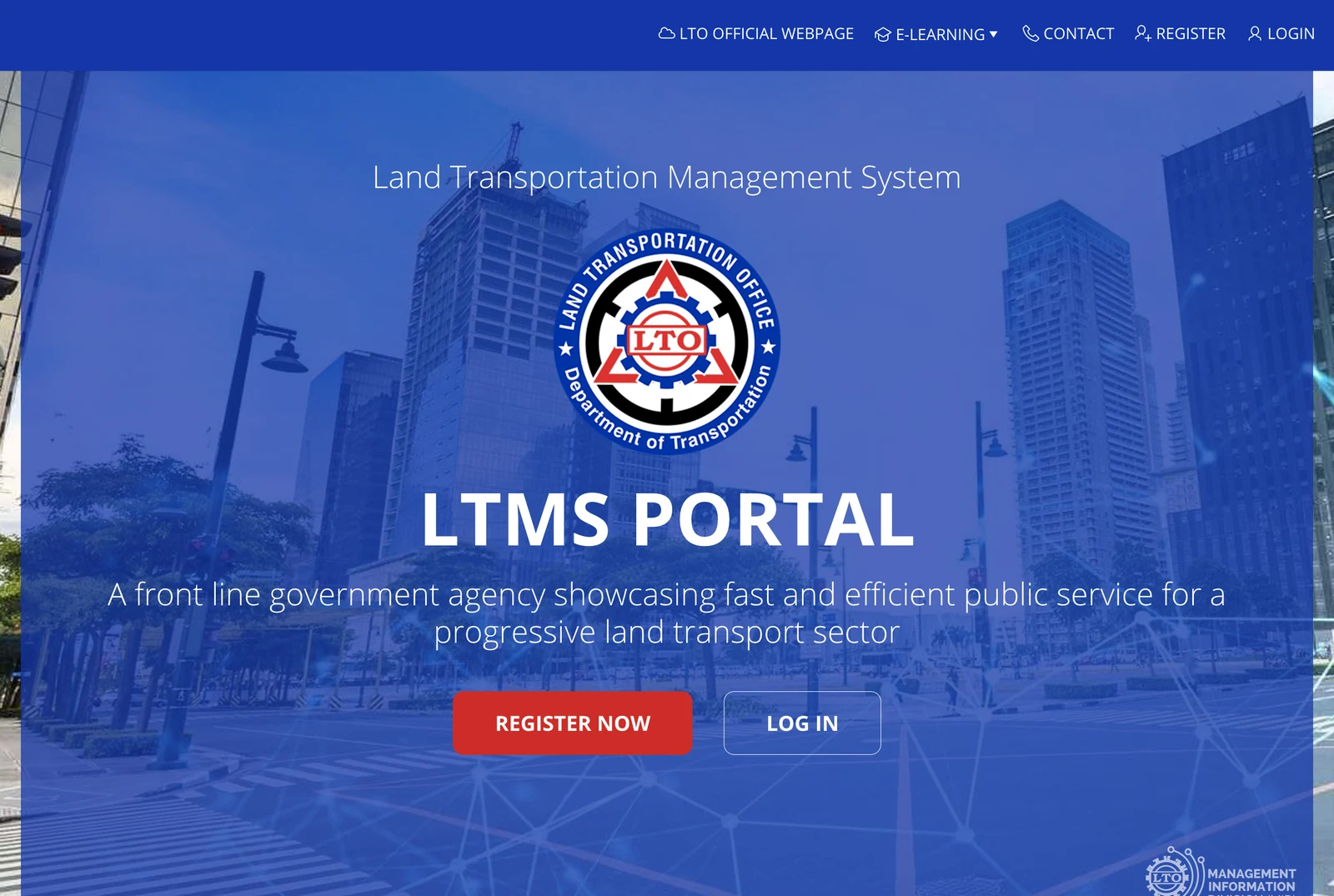
Tap a numbered point on the screen. 4 on this one — use the tabs above to move through the flow.
One page, two buttons and a menu. If a link you were sent looks nothing like this, close it and type the address instead.
Screens and control positions are the LTO’s and can change without notice; the portal has already changed release number twice this year. A page that does not carry the LTO header and footer, or that asks for a password before you have reached portal.lto.gov.ph yourself, is not the portal.
2026, in the order it happened
Four issuances explain the state of the system today. Read them in sequence and the confusing parts stop being confusing: the extension was granted because the LTMS was failing, the agency moved back to the LTMS anyway, and the extension was then lifted once the system held up.
Memorandum Circular MVL-2026-5523
VerifiedOctober 29, 2026 · Lifting of the validity extension granted under MVL-2026-5271
Regular validity and renewal schedules return for vehicle registrations, driver's and conductor's licences, student permits and medical certificates. Documents that expired from July to October 2026 get a staggered, penalty-free catch-up window; documents expiring from November 2026 onward follow the normal schedule again.
Memorandum MVL-2026-223
VerifiedSeptember 21, 2026 · Suspension of the Online Driver's License Renewal System (ODLRS)
The ODLRS was switched off and an alternative procedure set for applications already pending in it. If a renewal you started online in September went quiet, this is the order that explains it.
Memorandum MVL-2026-208
VerifiedSeptember 10, 2026 · Cessation of the LTO-IT system, reversion to LTMS
Motor-licence and vehicle-renewal transactions, plus driver's miscellaneous transactions, moved back to the LTMS. The second system the agency had been migrating to stopped being used, which is why the portal is once again the only front door.
Memorandum Circular MVL-2026-5271
VerifiedJuly 29, 2026 · Nationwide extension of validity due to LTMS issues
Registrations, licences, student permits and medical certificates due from 1 July 2026 were extended nationwide until further notice, with no late fees or penalties. The circular itself attributes the failure to stuck processes, network changes and insufficient storage — and to the agency's lack of full administrator access to its own system.
One thing the circulars say plainly and most coverage skips: MVL-2026-5271 attributes the failure to stuck processes, a changed network setup, insufficient storage and — its own words — the LTO’s “lack of full administrator access to the LTMS servers, databases, applications, and related systems”. That is the agency saying the vendor controlled the system it was accountable for. It is also why a portal outage is not something a branch can fix on the spot.
Your window, by the month you expired
MVL-2026-5523 replaced the open-ended extension with three dated bands. Inside your band you renew without additional fees or penalties; outside it, the ordinary late charges apply again. It covers motor vehicle registrations, driver’s and conductor’s licences, student permits and medical certificates that expired from 1 July to 31 October 2026.
| Expired in | You may renew from | Last day, no penalty | Status |
|---|---|---|---|
| July or August 2026 | November 3, 2026 | December 29, 2026 | Open now |
| September 2026 | December 1, 2026 | January 29, 2027 | Opens later |
| October 2026 | January 4, 2027 | February 26, 2027 | Opens later |
Two traps sit inside that table. The September and October windows had not opened on the day this page was checked — turning up early is not a head start, it is a transaction the counter may send back. And the window is not an amnesty for the deadline itself: it moves the deadline, so a November 2026 expiry is already back on the normal schedule with no window at all.
If your document expired before July 2026, the extension never applied to you. That is the ordinary late-registration case — the surcharge, the weekly rates and the driving penalty are priced in the late-registration guide.
Make the account, once, properly
Everything else on the portal hangs off one account, and most of the trouble people report starts here: a mistyped email, a name that does not match the licence record, a second registration made in frustration. The flow is short.
- Open portal.lto.gov.ph and choose Register Now — not a search result, and never a link sent by text.
- Read the Terms of Agreement and accept them at the bottom of the page, then enter the security code shown.
- Choose Enrol as an Individual. Companies, driving schools and dealers have their own enrolment.
- Fill in your name, birth date, address, mobile number and email exactly as they appear on your ID. A mismatch is what creates a duplicate record later.
- Create the account and open the verification email. The link expires, so use it the same day.
- Set the password from the link, then sign in with either your email address or your 15-digit LTO Client Number.
What the portal issues you is a 15-digit LTO Client Number. It is the durable identifier: an email address can be changed only through an LTMS issue request, while the Client Number stays. Write it down somewhere that is not the same phone you will lose.
Two documents matter later, and neither is uploaded at registration: a medical certificate from an LTO-accredited clinic, which the clinic transmits to the LTMS electronically, and the CDE certificate, which the portal generates itself when you pass. You do not photograph and upload either one.
Portal or counter — the honest split
The single most expensive mistake is driving to a branch for something the portal already does. The second is waiting for the portal to do something only a counter can. Here is every service, and where it finishes.
| Transaction | Where | What that means |
|---|---|---|
| Create an LTMS account, verify it, reset the password | Portal | Registration, email verification and the password reset all happen here. Free — anyone charging for it is a fixer. |
| Student-driver's permit: apply or renew | Both | The application, the appointment and the ₱100 application fee are online; the ₱150 permit fee, the photo and the printed permit are at the office. |
| Driver's licence renewal (plain or advance) | Both | The portal takes the application, the appointment slot and the payment. The photograph and biometrics are still taken in person. |
| Comprehensive Driver's Education (CDE) course and validation exam | Portal | Free, unlimited attempts, no time limit, certificate generated in your account on a pass. |
| Renewal of a licence expired for more than two years (with exam) | Both | Application and payment online, examination and biometrics at the office. |
| Foreign licence conversion, change of classification, add a restriction code | Both | Started on the portal, finished at the counter — these all need documents checked by a person. |
| Duplicate licence, revision of records, licence certification | Both | The request is online; the printing and release are not. |
| Motor vehicle registration renewal | Both | Online only if the vehicle already has an LTMS renewal on record and the CTPL and emission results were transmitted electronically. Otherwise it is a counter transaction. |
| Certificate of No Apprehension (CNA) and alarm checks | Portal | Applied for, paid for and printed from the portal; ₱100 certification fee plus ₱10 legal research fund. |
| Transaction history, digital ID, violation and demerit records | Portal | Read-only records of everything the LTO holds against your name and plate. |
| New registration, transfer of ownership, plate and sticker release | Branch | No portal path exists for these. They need the unit inspected and the papers surrendered. |
| Medical examination for a licence | Branch | Done at an LTO-accredited clinic, which transmits the certificate to the LTMS itself. The portal only receives it. |
Advertisement
Renew a licence: the 2026 path
The renewal itself is ₱585, and it takes two sittings: one on the portal, one at the branch. Nothing about the 2026 changes removed the second one — RA 10930 has the LTO take the photograph, and the card is printed at the office.
- Take the free CDE course and pass the validation exam inside the portal. 25 questions, 80% to pass, no time limit, and the certificate lands in your account.
- Get a medical certificate from an LTO-accredited clinic. The clinic transmits it to the LTMS; you do not upload a photograph of it.
- Start the renewal in Licensing, confirm your details, and pick the branch, date and time the portal offers.
- Pay through the portal's payment channel and keep the reference number. The official receipt arrives by email.
- Go to the branch for the photograph, biometrics and card release. The appointment is for this half, not for the paperwork.
Questions
25
Multiple choice
To pass
80%
20 correct
Time limit
None
Free, unlimited attempts
The exam is the one part of this people pay strangers for. It is free inside the portal, it is untimed, and a failed attempt costs nothing but the evening. The certificate is generated in the account — there is no PDF to email to a “processor”.
If your licence has been expired for more than two years the transaction changes: an examination is required and the total becomes ₱685, a ₱100 application fee plus the ₱585 licence fee. Expired for less than that, it is the plain renewal above — and if you are renewing inside a catch-up window, no penalty applies.
Renew a car's registration
Online renewal is conditional, and the condition is historical: the vehicle must already have an LTMS renewal transaction on record. A car last renewed under the old system, a brand-new registration, or a transfer of ownership has no online path — the counter is the only route, and no amount of refreshing the portal will change that.
- Check that the vehicle has a previous LTMS renewal on record. Without one, the online route is not open to you and the counter is the only way.
- Buy CTPL cover and have the vehicle tested at an accredited emission testing centre (or PMVIC, where one is required). Both must transmit their results electronically.
- Log in, open Vehicle, choose Renew Registration and let the portal validate those requirements.
- Choose the payment channel, save the application confirmation, then pay. The OR arrives by email.
- Keep the digital OR and CR; the printed ones follow from the branch or the courier arrangement your office uses.
The big number is the Motor Vehicle User’s Charge, which depends on the vehicle’s weight and type rather than on its price. These are the RA 8794 rates as the LTO collects them, doubled from the fourth year onward:
| Vehicle | Weight | MVUC / year |
|---|---|---|
| Passenger car | Up to 1,600 kg | ₱1,600 |
| Passenger car | 1,601 – 2,300 kg | ₱3,600 |
| Passenger car | Over 2,300 kg | ₱8,000 |
| Utility vehicle | Up to 2,700 kg | ₱2,000 |
| Utility vehicle | Over 2,700 kg | ₱2,000 + ₱40 per 100 kg over |
| SUV (1991 and later) | Up to 2,700 kg | ₱2,300 |
| SUV (1991 and later) | Over 2,700 kg | ₱2,300 + ₱46 per 100 kg over |
| Motorcycle, no sidecar | — | ₱240 |
On top of the MVUC the LTO collects its registration fee and small fixed charges; the emission test, the CTPL premium and any PMVIC inspection are paid to the testing centre and the insurer, not at the window. Those three are why a “registration cost” quoted online ranges from ₱2,000 to ₱8,000 for the same sedan.
What you pay at the LTO, line by line
These are the agency’s own collection items from the 2026 Citizen’s Charter, first edition. Nothing here includes the clinic, the insurer or the emission centre — they are separate payees, and folding them in is how a ₱585 renewal becomes a “₱1,685 total” on someone else’s page.
| Transaction | LTO total | Built from |
|---|---|---|
| Student-driver's permit (new) | ₱250 | ₱100 application fee (payable on the portal) plus ₱150 permit fee at the cashier. |
| Student-driver's permit (renewal) | ₱250 | Same split — ₱100 online, ₱150 at the counter. |
| Driver's licence renewal — plain or advance | ₱585 | The charter's standard total for both the walk-in and the portal route. |
| Licence expired more than two years (with examination) | ₱685 | A ₱100 application fee plus the ₱585 licence fee. |
| Foreign licence conversion | ₱785 | ₱100 conversion fee plus the ₱685 licence fee. |
| Non-professional to professional classification | ₱685 | ₱100 application fee plus ₱585 licence fee. |
| Revision of records | ₱325 | Add ₱100 more if it is done together with a renewal, and the renewal fee itself. |
| Certificate of No Apprehension | ₱110 | ₱100 certification fee plus ₱10 legal research fund. Paying through GCash adds about ₱54 in convenience fees. |
Paying through the portal’s channels adds a convenience fee charged by the channel, not by the LTO — for GCash on a Certificate of No Apprehension the charter prints about ₱54, which is a useful yardstick for what the other online payments cost on top. If a total you are quoted is much higher than the charter line, ask which item the difference is.
When the portal says no
Six failures account for nearly every complaint, and only one of them is genuinely yours to fix. The rest are the LTO’s to fix, through a service the charter calls “LTMS related issues and concerns — clients”.
The verification email never arrives
WhySpam filtering, an address typed with a typo, or a mail queue that is behind — all three are common, and the third is not your fault.
Search the inbox for 'LTMS' including spam, wait an hour, then ask for a resend through the LTMS issues request. A wrong address cannot be edited by you; the LTO has to correct it.
Two accounts, one person
WhyRegistering again after a failed verification, or a name that did not match the licence record the first time.
The charter lists deletion of duplicate portal accounts as an LTMS issue the agency handles. Bring both email addresses and one valid ID.
The licence record will not link to the account
WhyThe account's name, birth date or licence number differs from the record — one letter is enough.
Request linking of the licence, permit or medical certificate as an LTMS issue. Do not create a third account to 'start clean'.
A renewal started in September is stuck
WhyThe Online Driver's License Renewal System was suspended on 21 September 2026 under MVL-2026-223.
That memorandum sets the alternative procedure for pending applications. Ask the branch to move the application to the LTMS route rather than starting a second one.
Payment went through, no receipt
WhyThe receipt is emailed, and the transaction only completes when the payment channel posts back.
Check Transactions for the application status before paying again. Paying twice is the expensive version of this mistake.
Someone offers to 'process' it for a fee
WhyRegistration and renewal on the portal are free apart from the LTO's own fees.
There is no expedite lane and no fixer with a faster portal. The only legitimate fees are the ones in the table above.
The charter gives the LTO five minutes to act on most of these and a working day for anything needing a signature. In practice the queue is longer after an outage, so start the request the day you hit the problem rather than the week your registration lapses.
LTMS portal questions
Is the LTO LTMS portal working in 2026?
Yes. The portal is live at https://portal.lto.gov.ph/ords/f?p=1200:HOME:::::: and its footer reads Release 2.5.4, checked on November 23, 2026. That is a change of direction: on 10 September 2026 the LTO stopped using the LTO-IT system for licence and registration renewals and reverted to the LTMS (Memorandum MVL-2026-208), and on 21 September it suspended the separate Online Driver's License Renewal System (MVL-2026-223). Individual screens still fail now and then, but the portal is the agency's only front door again.
What can I do on the LTMS portal without going to an LTO branch?
Create and verify an account, take the free CDE course and validation exam, start a licence or student-permit application, book the branch appointment and pay through the portal, request and pay for a Certificate of No Apprehension, read your transaction history, digital ID, violations and demerit points, and — only if the vehicle already has an LTMS renewal on record — renew a motor vehicle registration. New registration, transfer of ownership, plate and sticker release, the medical examination and the photograph and biometrics for a licence are all still counter work.
How do I create an LTMS account?
Open portal.lto.gov.ph and choose Register Now. Accept the Terms of Agreement at the bottom of the page and enter the security code, then choose Enrol as an Individual. Fill in your name, birth date, address, mobile number and email exactly as they appear on your ID — one mismatched letter is what creates a duplicate record that later refuses to link to your licence. Create the account, open the verification email the same day, set a password from the link, then sign in with either that email or your 15-digit LTO Client Number.
How much does a driver's licence renewal cost in 2026?
₱585 for a plain or advance renewal, which is the LTO's own total in the 2026 Citizen's Charter for both the walk-in and the portal route. A licence expired for more than two years, which needs an examination, is ₱685: a ₱100 application fee plus the ₱585 licence fee. The medical certificate is paid to the clinic and is not part of either figure — which is why guides that quote ₱1,600 or more are bundling a clinic fee and a paid reviewer into something they call the LTO fee.
Is the CDE exam free, and how many questions does it have?
Free, and the portal's own exam page sets the rules: 25 questions, a pass mark of 80% or 20 correct answers, and no time limit. Attempts are unlimited and the certificate is generated inside your account when you pass — there is nothing to download and upload elsewhere. Anyone selling a "CDE certificate" is selling a reviewer, not the exam.
Do I still have to visit an LTO office after applying online?
For a licence, yes. The portal takes the application, the appointment and the payment; the photograph, the biometrics and the card release happen at the branch. RA 10930 requires the photograph to be taken by the LTO, so no online route replaces that visit — the portal's job is to make the visit short. The LTO has also put digital renewal inside the eGovPH app, but the same in-person capture applies to the card.
Can I renew my car's registration on the portal?
Only if two things are already true: the vehicle has a previous LTMS renewal transaction on record, and the CTPL cover and emission test results were transmitted electronically by the insurer and the testing centre. Log in, open Vehicle, choose Renew Registration, let the portal validate those requirements, pick a payment channel, pay and keep the application confirmation — the official receipt arrives by email. A first registration, a transfer of ownership, or a vehicle last renewed under the old system has to be done at the counter.
My licence or registration expired in September or October 2026. What happens now?
The blanket extension under MVL-2026-5271 ended with MVL-2026-5523, but the circular replaced it with penalty-free catch-up windows keyed to the month you expired. July and August 2026 expiries renew from 2026-11-03 to 2026-12-29; September 2026 expiries from 2026-12-01 to 2027-01-29; October 2026 expiries from 2027-01-04 to 2027-02-26. Documents expiring from November 2026 onward follow the normal schedule again, and missing your window means the ordinary late fees return.
How do I get a Certificate of No Apprehension online?
Sign in, open Documents, choose No Apprehensions, then apply for the certificate — driver or vehicle — and answer the required fields. Pay the ₱100 certification fee plus the ₱10 legal research fund through the portal's payment channel, print the receipt and the certificate, and submit the supporting documents to the Law Enforcement Service's Data Control Unit. The certificate is released after their review, which the charter puts at about one working day.
The verification email never arrived, or I am locked out. What do I do?
Search the inbox for 'LTMS' including spam, and wait an hour before assuming it failed. A wrong email address cannot be edited by you — the LTO's LTMS-issues service handles correction of email and personal information, account verification, duplicate-account deletion, linking of a licence or medical certificate, and resending the verification email. Creating a second account is what turns a small problem into a duplicate record, so ask for the fix instead.
Advertisement
Sources and disclaimer
A guide, not an LTO computation and not a quotation. The fees are the agency’s published collection items; the deadlines are its own circulars; the screens are captures of the live portal on November 23, 2026. The portal changes without notice, so confirm the button you are looking at before you pay anything. Everything on this page was read on November 23, 2026.
The screenshots are the LTO’s interface, reproduced here to show which control does what. The portal’s own terms of use claim copyright in its contents; they are not reproduced as a substitute for the service, and every transaction this page describes has to be done on the portal itself.
The primary documents, in the order they matter:
- The LTMS portal itself — the screens, the release number and the CDE rules on this page were read here
- LTO Citizen's Charter 2026, 1st edition — the fee lines, the portal steps and the LTMS-issues service
- LTO issuances — MVL-2026-5523, MVL-2026-223, MVL-2026-208 and MVL-2026-5271 in full
- Philippine News Agency — the November 2026 advisory that set out the catch-up windows
- LTO-NCR announcements — where a suspension appears first
Know the deadline before the counter does
Once your catch-up window closes, the statutory surcharge comes back: 50% of the MVUC for every missed year. The late-registration guide prices yours and names the circulars that matter.